Glitch Minigames
A free, open-source minigame library for FiveM
—
stars on GitHub
—
members in Discord
29 ready-to-use, fully configurable minigames — from skill checks and lockpicks to memory puzzles and wire connecting. Drop them into any resource with a single export call.
Try a minigame
Pick any game from the sidebar, tweak its parameters, and hit Reload to preview live. Click ? on the config panel for per-game parameter docs.
Getting Started guide
New here? The walks you through installation, your first export call, and how to handle the result callback.
Parameter Reference
Looking for a specific param? The table lists every parameter for every game with types, defaults, and ranges.
Theme Configuration
Want to change colors or visual style? The section covers color themes, visual themes, background opacity, and creating your own custom theme.
Made with ❤ by Glitch Studios
No screenshot yet
GTA Native
—
—
This minigame uses GTA scaleforms and runs natively inside FiveM. It cannot be previewed in the browser.
Export Call
☷ Parameter Reference
All 29 minigames and their configurable parameters
| Game | Parameter | Type | Default | Min | Max |
|---|
No matching parameters
📄 Getting Started
How to install, trigger, and handle results from Glitch Minigames
Installation
Download or clone the resource and drop it into your
resources/ folder, then add it to your server.cfg:ensure glitch-minigames
The resource is standalone — no dependencies required.
Your First Export Call
Call any minigame from a server-side or client-side script using exports. All calls are async and return a boolean result:
-- Client-side example
local success = exports['glitch-minigames']:StartBarHitGame(
    3,      -- rounds
    55,     -- speed
    20,     -- zoneSize (%)
    3,      -- maxFailures
    30000   -- timeLimit (ms)
)

if success then
    -- Player passed the minigame
    TriggerServerEvent('myResource:minigamePassed')
else
    -- Player failed
    notify("You failed! Try again.")
end
Handling Results
Every export call yields — it pauses the script thread until the minigame is complete. Use
Citizen.Await if you need to call from an async context:-- With Citizen.Await (async context)
local p = promise.new()
Citizen.SetTimeout(0, function()
local success = exports['glitch-minigames']:StartLockpickGame(3, 30, 2, 40, 500)
p:resolve(success)
end)
local result = Citizen.Await(p)
if result then
print('Door unlocked!')
end
Return value is always
true for success, false for failure (timeout, max failures, etc.).All Export Signatures
Every available export with parameter names. Use the Reference tab for types and ranges.
NUI / Browser Testing
You can trigger any game directly in the browser for testing without FiveM. Open the browser console and dispatch a message event:
// Trigger Bar Hit in the browser
window.dispatchEvent(new MessageEvent('message', {
    data: {
        action: 'startBarHit',
        config: { rounds: 3, speed: 55, zoneSize: 20, maxFailures: 3, timeLimit: 30000 }
    }
}));
This is exactly how the Example Code button's JS tab works — use it to get the right action name and config shape for any game.
Overriding the Visual Theme
Send a
setColors event before the game event to change the colour palette:exports['glitch-minigames']:SetColors({
primary = '#ff6b35',
primaryRgba = '255,107,53',
secondary = '#cc5500',
secondaryRgba = '204,85,0',
-- ... other color keys (see docs)
})
local success = exports['glitch-minigames']:StartSkillCheckGame(...)
Theme Configuration
Customize color schemes and visual styles across all minigames
Color Themes
Color themes control all colors used throughout the minigames — backgrounds, buttons, text, success/failure indicators, and more. Set the active theme in
shared/config.lua:config.ActiveTheme = 'cyan' -- Options: 'cyan', 'monochrome'
Available Color Themes
| Theme | Style | Primary | Background | Success |
|---|---|---|---|---|
cyan |
Blue gradient | #33b5e5 | #0f1e2d | Light blue flash |
monochrome |
Grayscale | #ffffff | #000000 | Cyan/green flash |
Color Theme Properties
Each theme defines the following property groups. Every hex color has a matching
*Rgba counterpart (e.g. primaryRgba = '51, 181, 229') containing the RGB values for use in CSS rgba() expressions.| Group | Keys | Description |
|---|---|---|
| Primary | primary, secondary | Main accent and gradient colors |
| Feedback | success, failure | Pass/fail flash and indicator colors |
| Warning | warning | Timer expiry and caution indicators |
| Backgrounds | background, backgroundGradient1, backgroundGradient2, backgroundSecondary, backgroundTertiary | Panel and gradient backgrounds |
| UI | border, text, textSecondary, danger, safe | Borders, text, danger and safe zone colors |
| Minigame | minigameColor1 – minigameColor5 | Per-game accent colors (Simon Says, VarHack, Memory Colors, etc.) |
Creating a Custom Color Theme
Add a new entry to
config.Themes in shared/config.lua, then point ActiveTheme to it:config.Themes['myTheme'] = {
-- Primary Colors
primary = '#ff6b6b', primaryRgba = '255, 107, 107',
secondary = '#ee5a5a', secondaryRgba = '238, 90, 90',
-- Feedback Colors
success = '#4ecdc4', successRgba = '78, 205, 196',
failure = '#ff4444', failureRgba = '255, 68, 68',
-- Warning Colors
warning = '#ffe66d', warningRgba = '255, 230, 109',
-- Background Colors
background = '#2c2c2c', backgroundRgba = '44, 44, 44',
backgroundGradient1 = '#2c2c2c', backgroundGradient1Rgba = '44, 44, 44',
backgroundGradient2 = '#3d3d3d', backgroundGradient2Rgba = '61, 61, 61',
backgroundSecondary = '#1a1a1a', backgroundSecondaryRgba = '26, 26, 26',
backgroundTertiary = '#333333', backgroundTertiaryRgba = '51, 51, 51',
-- UI Colors
border = '#ff6b6b', borderRgba = '255, 107, 107',
text = '#ffffff', textRgba = '255, 255, 255',
textSecondary = '#b0b0b0', textSecondaryRgba = '176, 176, 176',
danger = '#ff3030', dangerRgba = '255, 48, 48',
safe = '#36ff00', safeRgba = '54, 255, 0',
-- Minigame Specific Colors
minigameColor1 = '#273cfcff', minigameColor2 = '#2add57ff',
minigameColor3 = '#28e757ff', minigameColor4 = '#edeb64ff',
minigameColor5 = '#eb87deff',
}
config.ActiveTheme = 'myTheme'
Visual Themes
Visual themes control the overall appearance and style of the minigame UI — layout, animations, and design elements. They are fully independent of color themes and can be combined freely. Set the active visual theme in
shared/config.lua:config.ActiveVisualTheme = 'classic' -- Options: 'classic', 'modern'
Available Visual Themes
| Theme | Description | Layout | Animations |
|---|---|---|---|
classic |
Original Glitch Studios design | Traditional panel layout | Standard transitions |
modern |
New sleek redesign | Minimalist UI elements | Smooth, refined animations |
Background Opacity
Customize the background transparency for each visual theme independently:
config.BackgroundOpacity = {
    classic = 0.80,  -- 80% opacity for classic theme
    modern  = 0.90   -- 90% opacity for modern theme
}
Combining Themes
Color themes and visual themes are fully independent — mix and match freely. For example, the cyan color theme paired with the modern visual theme:
config.ActiveTheme       = 'cyan'
config.ActiveVisualTheme = 'modern'
Color Theme Previews
Cyan Theme
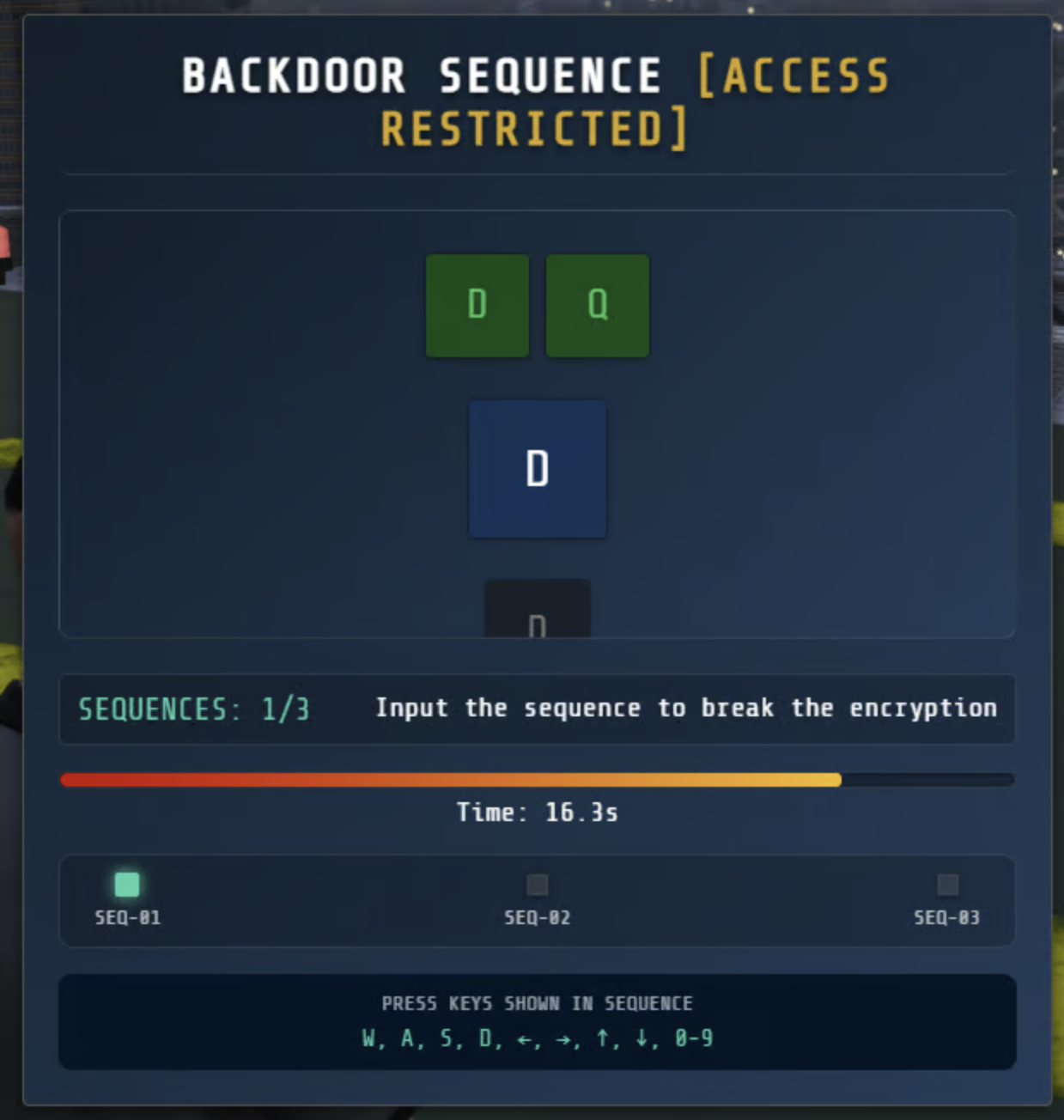
Tiles & Buttons: #33b5e5 → #0078d7
Background: Dark blue #0f1e2d
Success: Light blue flash
Failure: Red flash #ff4444
Timer Warning: Dark orange #ff7a30
Monochrome Theme
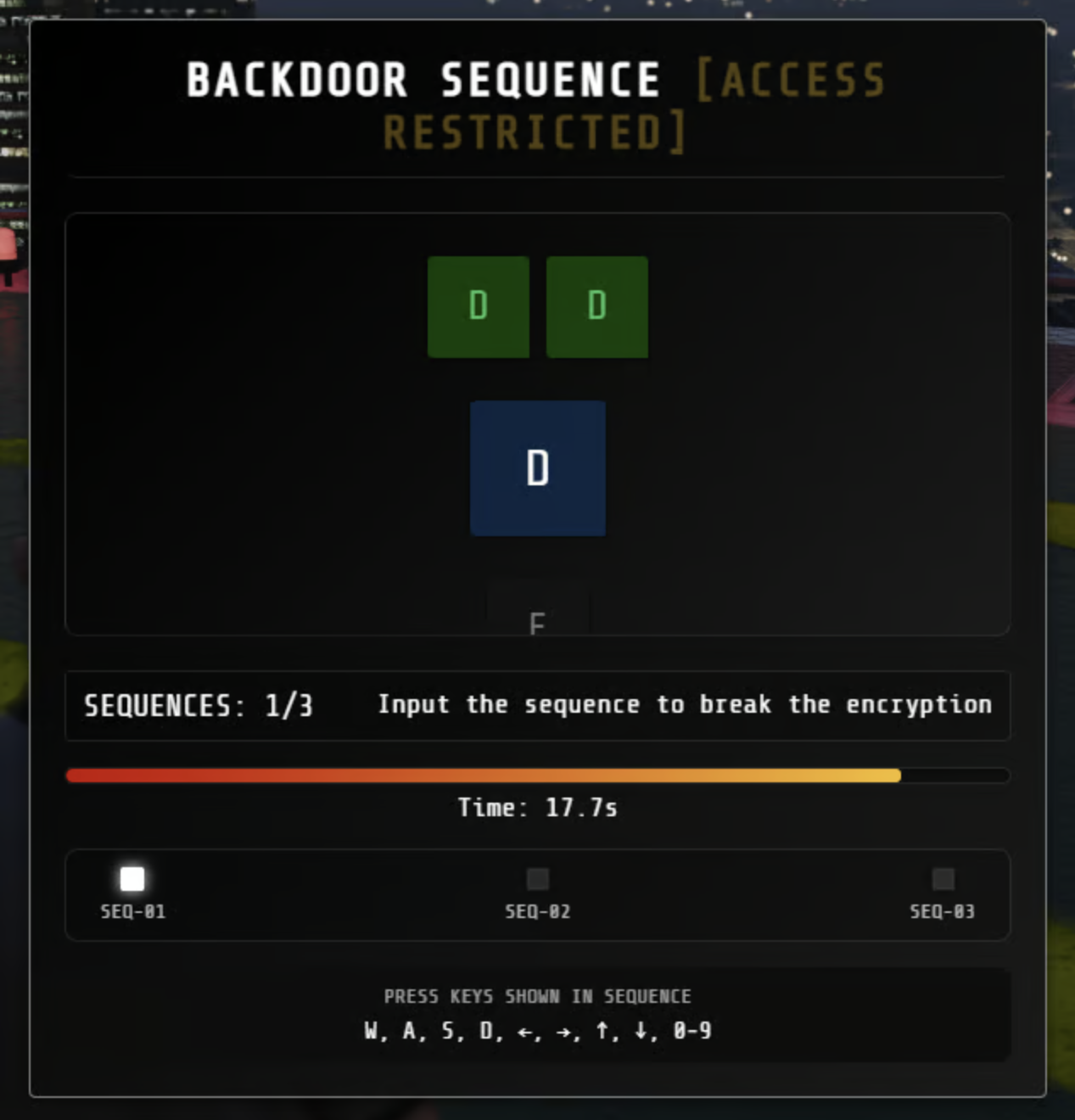
Tiles & Buttons: White → light gray
Background: Pure black #000000
Success: Cyan flash #2dd4a8
Failure: Red flash #ff4444
Borders: Medium gray #808080
Running
—
FIREWALL PULSE [BREACH IN PROGRESS]
ATTEMPTS: 0/3
Click to stop the pulse inside the safe zone
Time: 10.0s
BACKDOOR SEQUENCE [ACCESS RESTRICTED]
SEQUENCES: 0/3
Input the sequence to break the encryption
Time: 15.0s
SEQ-01
SEQ-02
SEQ-03
PRESS KEYS SHOWN IN SEQUENCE
W, A, S, D, ←, →, ↑, ↓, 0-9
CIRCUIT RHYTHM [SYNCHRONIZE REQUIRED]
0
COMBO
SCORE: 0
Hit the notes in sync with the beat
Progress: 0%
Press keys to match falling notes
E
VAR SIMULATION [MEMORY TEST]
PREPARING INTERFACE...
Memorize the pattern
Time: 0.0s
NEURAL PATTERN [MEMORY MATRIX]
🧠
PREPARING MEMORY MATRIX...ROUND: 1/3
Memorize the pattern
Time: 3.0s
SEQUENCE PATTERN [NEURAL SEQUENCE]
🔄
PREPARING SEQUENCE MATRIX...ROUND: 1/5
Watch the sequence
Time: 3.0s
NUMBERED SEQUENCE [NUMERICAL MATRIX]
🔢
PREPARING NUMBERED MATRIX...ROUND: 1/3
Memorize the numbered sequence
Time: 4.0s
VERBAL MEMORY [WORD RECOGNITION]
📝
PREPARING WORD MATRIX...WORD
SCORE: 0 | STRIKES: 0/3
Click SEEN if you've seen this word before, or NEW if it's a new word
Time: 5.0s | Words: 0
SYMBOL SCAN [TARGET ACQUISITION]
🔍
INITIALIZING SCANNER...
FIND TARGET:
◆
Find and select the target symbol
Time: 30.0s
W A S D / ↑ ↓ ← → Move
ENTER / SPACE Select
PIPE PRESSURE [FLOW CONNECT]
Click pipes to rotate. Connect START to END.
Time: 30.0s
PAIRS [MEMORY MATCH]
Find all matching pairs. Click cards to flip them.
Pairs: 0 / 0
Attempts: 0
Time: 30.0s
MEMORY COLORS [MEMORIZE]
Memorize the colored boxes
Round: 1 / 3
Score: 0
Time: 5.0s
UNTANGLE [NETWORK]
Drag dots to untangle. No lines should cross.
Crossings: 0
Time: 60.0s
FINGERPRINT [SCANNER]
Align all arc segments to complete the fingerprint
Aligned: 0/5
Time: 30.0s
CODE CRACK [PIN BREACH]
Time: 60.0s
WORD CRACK [LEXICON BREACH]
Time: 120.0s
BALANCE [STABILIZATION REQUIRED]
Q
E
STABLE
Keep the needle balanced by pressing Q and E - don't let it fall into the red zones!
PRESS E
ROUND 1/3 | ✕0/3
—
SKILL CHECK [BREACH WINDOW]
E
ROUND: 1/3 | MISSES: 0/1
Press the key in the zone!
15.00s / 15.00s
NUMBER UP [SEQUENCE LOCK]
NEXT:1
Done: 0 / 20 | Errors: 0/3
Click numbers in order from 1 upward
Find the next number!
KEYS [ACCESS LOCK]
Press the keys in the correct order!
Done: 0 / 18 | Errors: 0/3
Press the highlighted key
Awaiting input...
CMD 1 / 3
6.0s
Hold E & release in zone
Round 1 / 3
WIRE CONNECT [CIRCUIT MAPPING]
Select a left terminal to begin
SIGNAL SYNC [PATTERN LOCK]
Round 1 / 5
Watch carefully…
0 / 1
1
2
3
4
AIM TEST [TARGET ACQUISITION]
HITS: 0/10
MISSED: 0/5
Click the targets before they disappear!